
| |
Home PIN Login Support Test your pdf document
| Support menu | Overview | Compliance | Page/Font/File Settings | LaTeX Support | MS-Word Support | Upload Help | Copyright Transfer | Compliant Conversion Issues | FAQ |
| PDF File Requirements | |
| Why has the the conference adopted these requirements? |
Until recently, IEEE Xplore®, the IEEE's online premier document delivery system, has presented conference
proceedings as bitmapped images scanned from print.
Distilled PDF has since been selected as the required format because it presents significant quality improvements over scanned PDF. Font display is sharper, charts and photos can be shown in their original colors, and distilled PDF documents can be searched using Adobe Acrobat's built-in text-finding feature. These quality improvements add value to proceedings delivered through IEEE Xplore®, which is visited by tens of thousands of researchers daily. Source: IEEE |
| What are these compliance requirements that my document must meet? |
The following characteristics are required for pdf compliance:
|
| How do I verify if my PDF meets these requirements? |
You can check if your document meets most of the requirements by opening
these windows in Adobe Acrobat Reader:
File | Document Properties | Summary
File | Document Properties | Fonts
File | Document Security
Unfortunately, you cannot determine information about image resolution. The person preparing the document must ensure that the images comply with the requirements. For your convenience, PaperPlaza has implemented tests for fonts and security. You can test whether your file meets PDF version number compatibility, fonts and security requirements by uploading the file through the Test your pdf document link. |
| Why are Type 3 fonts not acceptable? |
Bitmapped fonts are created for specific devices.
Hence fonts created for print (at, say, 300 dpi) do not render well on screen and those created for screen do not print properly.
See the example below: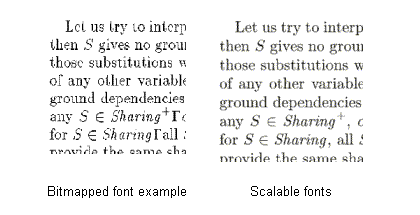 The image to the left was created for printing at 300dpi on a laser printer using bitmapped fonts (Type 3), while the one on the right was created using scalable/vector fonts (Type 1). Vector fonts scale to the resolution of the device and hence appear crisp on screen as well as in print. |
| I don't care about compliance, why can't I just upload my file for review? |
Unfortunately, if your manuscript does not pass the PDF version number compatibility, fonts and security requirements then
you will not be able to upload it.
If you are having difficulty preparing your PDF manuscript, check
out additional resources on this website while preparing your document
using TEX/LATEX or Microsoft Word. |